

Issue Management
In InterSystems Supply Chain Orchestrator™, an issue is an InterSystems IRIS® object that is used to capture any risk, concerns, or things which may impact the supply chain. Most issues may also require some kind of action to minimize the impact. Some examples are late shipments, inventory stock out, labor shortage, and so on. An issue can be linked to an specific instance of a supply chain object, such as an order, a shipment, inventory and so on, but the relationship is not always required. Issues can be tracked by category, associated data object, time frame, status, and so on.
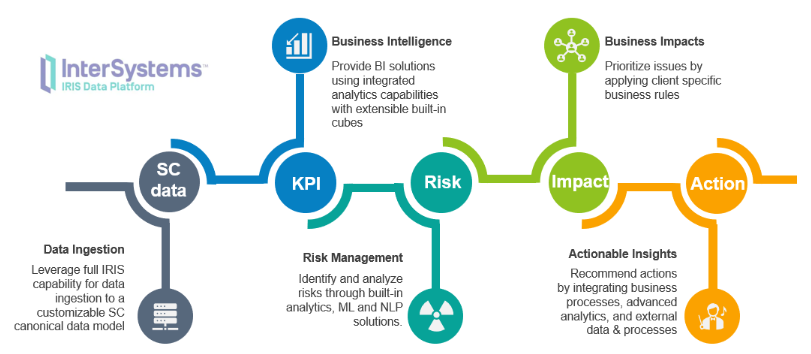
The following diagram shows how supply chain data is processed in Supply Chain Orchestrator, and related technologies used. Risks in the diagram are modeled using the issue object, and related impacts as well as actions are also linked to the issue object (that is, the issue API also returns associated impact and action data if that exists).
Example Issue Analysis
Issue management is at the core of Supply Chain Orchestrator. Issue management in turn includes issue analysis and resolution. The following is an example of an issue resolution as shown in a demo UI:
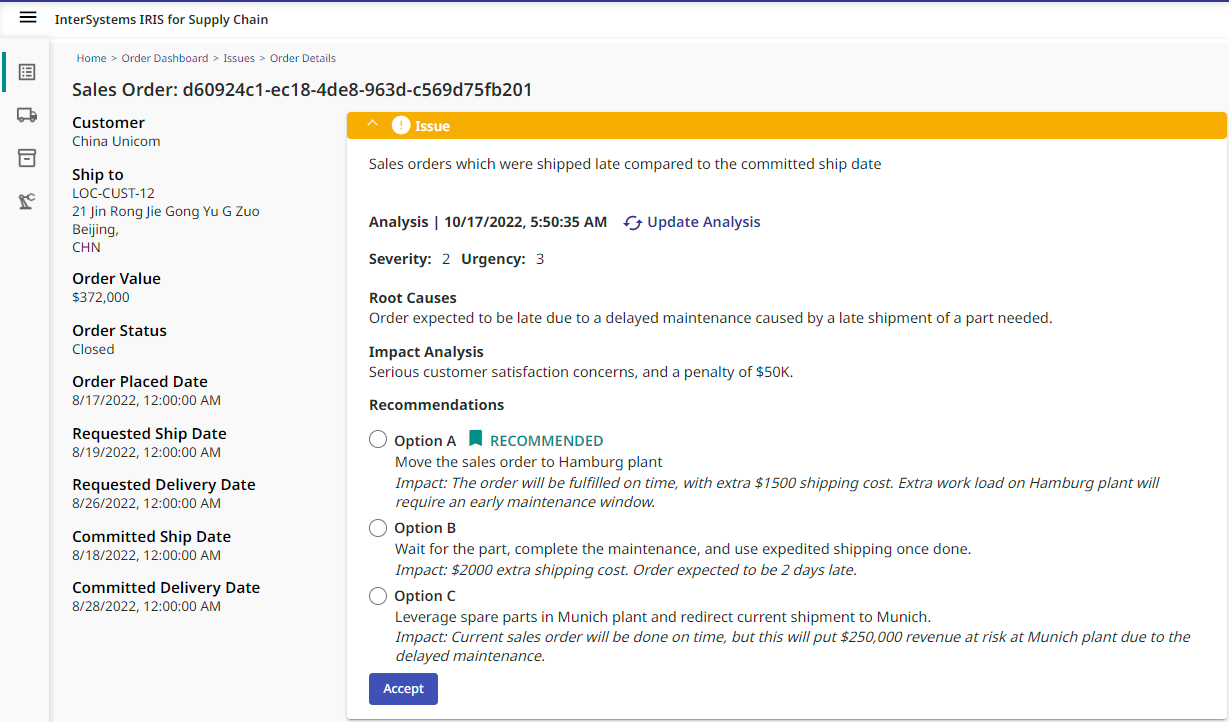
As shown in the example above, an issue analysis can cover the following, but not limited to, aspects:
-
Root cause analysis
-
Impact analysis
-
Issue rating by severity and urgency
-
Issue resolution/recommendation
-
Actions related to the resolution, such as sending out a notification, or place an order in ERP system, and so on
You implement the analysis in an InterSystems IRIS business process by using a graphical UI that is designed for business logic.
Issue Life Cycle
The following diagram shows the life cycle of issues in Supply Chain Orchestrator.
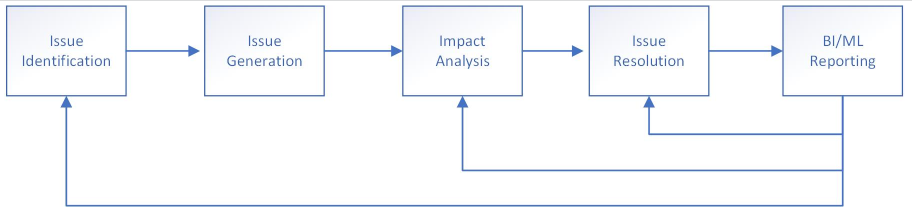
There are different ways to identify and generate issues. One common approach is to auto-generate issues using KPIs, i.e., an issue is generated for every record that meets the KPI conditions. For example, a late-delivery KPI for sales orders can generate an issue for every late-delivery order.
KPIs are only one way to generate issues. Other ways to generate issues include
-
Through BPL/DTL processes in Supply Chain Orchestrator. Any data integration or business process can be used to generate issues for specific conditions.
-
By a Smart Data Service (SDS). For example, a SDS can be implemented to subscribe to external events, and determine the impacts on current supply chain. Such impacts can be captured in the form of issues and persisted in InterSystems IRIS.
-
Sent in from external systems. Supply chain risks can be determined outside Supply Chain Orchestrator. For example, a manufacturing application may determine a part shortage for certain product at a plant, and the information can be sent to Supply Chain Orchestrator as an issue through API for issue resolution and reporting purpose.
Each issue can have a business process associated with it for impact analysis and issue resolution logic. Business impacts include setting up the severity and urgency levels, estimated the time and money impacts, as well as other implications for the issue.
The same business process can also be used to implement resolution logic. Issues can be automatically resolved through a process, or it may require business user to review the options and make a final decision (in which case InterSystems IRIS Interoperability workflow is used).
Generating Issues from KPIs
A KPI can generate issues. To enable issue generation for a KPI, specify the following in the KPI definition:
"issueKpi": true,
If this value is set to true, you can also add the following optional attributes to the KPI definition:
-
defaultIssueSeverity specifies the default severity level for all issues generated from this KPI
-
analysisService specifies the BPL name for running and issue analysis and resolution logic
There are automatically run system tasks to update issues for all issue-enabled KPIs:
-
SC.Core.Tasks.UpdateKPIIssues generating issues as needed for KPIs. Specifically, this task does the following for each issue-enabled KPI:
-
Identify the records that triggered the KPI condition (such as the late orders)
-
Check to see if the database contains issues that correspond to these records in combination with this KPI. If the issues do not yet exist, the task creates them, using information contained in the KPI definition, including the name of the business process that analyzes this kind of issue by default. The new issues have open status.
-
Check to see if the database contains additional records associated with this KPI (records not currently triggering the condition but that previously did so). If so, the task updates those issues to close them; specifically it sets the status to closed, and resolutionType to noLongerValid.
-
-
SC.Core.Tasks.AnalyzeAllNewIssues starts issue analysis. This task looks at all non-closed issues that do not yet have an issue analysis record. For these issues, the task creates a new issue analysis. In the Visual Trace for the production, you will see SC.Core.BP.Service.SingleIssueSS receiving an issue analysis request message. SC.Core.BP.Service.SingleIssueSS will then send a message to the business process that is named by the issue.
If the business process includes workflow, the Visual Trace will also show those components as applicable.
There are also API calls to run the KPI issue update logic.
Introduction to the Issue Management API
Supply Chain Orchestrator provides an data APIOpens in a new tab, which includes options for working with issues:
POST {{IRIS-SERVER}}/api/scbi/v1/issues
With the issue value in JSON format added to the body of the request.
GET {{IRIS-SERVER}}/api/scbi/v1/issues
Additional query parameters based on any issue attributes can be added in the form of HTTP parameters, such as `status=open`.
POST {{IRIS-SERVER}}/api/scbi/v1/kpiissues
Forces an issue update for the given KPI. This applies to KPIs that are issue-enabled. In this case, specify KPI information in the JSON body data, for example:
{
    "kpi": "SalesOrderLateShipVsCommitted"
}
POST {{IRIS-SERVER}}/api/scbi/v1/analyzeissue/[ISSUE-ID]
This option applies if a process is associated with an issue. In this case, specify the process to use by including the following JSON body data:
{
    "processName": "YourProcessName"
}

