

New in InterSystems Health Connect Cloud 2026.2
This page describes the new features, enhancements, and other significant updates in the 2026.2.0 release of InterSystems Health Connect Cloud™.
For other information you may wish to consider related to changes included in this release, see the InterSystems Health Connect Cloud Upgrade ChecklistOpens in a new tab.
Enhancing Data Management and SQL
InterSystems SQL supports both stored procedures and Common Table Expressions (CTEs). In the 2026.2 release, you may now use them together, creating a stored procedure that contains a CTE.
Modernizing Interoperability User Interface
The following enhancements are included in InterSystems Interoperability-enabled products in the new user interface that continues to be an opt-in experience for most customers.
-
Improved visibility of the toggle options to switch between the Production Toolbar view and the Host Toolbar view.
-
Host actions are now present at all time in the Host Toolbar, even when a host is not selected. The actions are disabled until a host is selected and options are viable.
-
Added ability to enter multiple values in the Categories field with a comma-delimited list.
-
Added ability to rename an existing category.
-
When creating a new Process class, you can now configure a new Rule to automatically invoke source control actions, streamlining class export and source control integration workflows.
-
The Session Start message is now highlighted in green, reflecting the old behavior.
-
Added ability to copy raw message contents from the inspector panel.
-
Added an autocomplete feature on Source and Target fields of Message Search.
-
Visual Trace references to a rule in an activity now link to the link and open it in a new tab.
-
Added a column that indicates whether a message was resent in the messages table and in the message inspector to the Message Viewer.
-
Added ability to expand the message body, header, and contents sections at the same time.
-
Added a configurable notification feature that provides information when a search is started, in progress, and complete.
-
Added ability to edit a saved search and to save any edits as a new search.
-
Executing a saved search highlights the Saved Search icon, indicating an active saved search filter is in use.
-
Find your previously searched Message Search criteria SQL query in the Search History alongside the historical search’s run time and duration.
-
Message searching that use an active saved search now show the name of the saved search above the messages table.
-
Disabled extended search criteria during an active search to prevent adjustments.
-
Clicking the Extended Criteria icon in the toolbar now hides the dropdown; the Hide button is still available to hide the dropdown as well.
-
Added an indication (an asterisk) that you have changed the criteria of a previously executed saved search before executing the new, edited search.
-
Added ability to filter a trace by showing corresponding messages when right-clicking a message event.
-
Added ability to load new Visual Traces in a new tab without the message viewer, enabling sharing of session links.
-
Selecting two message activities now shows the time delta between the selected events.
-
Added boundaries for independent scrolling in the top panel of the graphical editor.
-
Added ability to alphabetically sort segment field path expressions.
-
Read-only and internal properties now appear greyed out in the DTL Editor to prevent invalid mappings.
-
Made the right-side inspector panel icon consistent with the show icon.
-
Added more padding on text within an activity shape and truncated characters for readability.
-
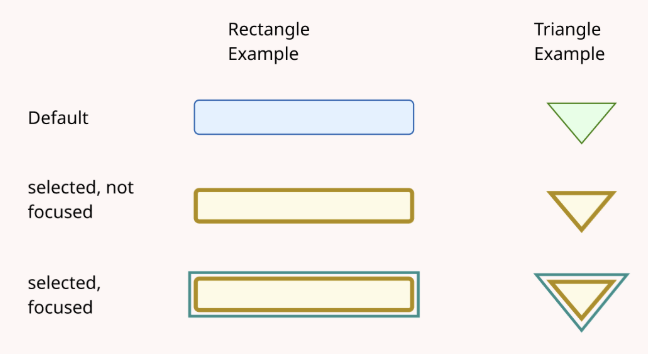
Enhanced multi-selected activity shapes and components when selected and focused. See an overview in the picture below.
-
Improved automatic rearrangement of activities by reducing the number of overlapping lines on lower level activity shapes.
-
Styled the Schema Viewer consistently across data standards.
-
Made HL7 schema segments expandable and collapsable.
-
Enhanced the HL7 Schema Segment Structure page to show the segment path of the selected segment.
-
Added type, search, and filter DocType and Source constraints in text fields.
-
Enhanced general usability be improving formatting and visuals, while also implementing and addressing various user-specific requests.
