
Expressions in Business Rules
This page provides information on the variables, operators, functions, and expressions you can use in a business rule.
The context Variable
A business rule can refer to the context variable defined by the BPL that calls the business rule.
The context variable contains any data that needs to be persisted during the life cycle of the business process. This variable is an object with properties and defined when creating the BPL business process; see Defining the context ObjectOpens in a new tab. To refer to a property of the context object, use dot syntax and the property name, as in: context.MyData
Property names are case-sensitive and must not be enclosed in quotes, for example, PlaceOfBirth.
For context properties that contain collections such as lists and arrays, InterSystems IRIS supports several retrieval methods from within business rules, including Count(), Find(), GetAt(), GetNext(), GetPrevious(), IsDefined(), Next(), and Previous(). For more information, see Working with Collections.
The Document Variable
A business rule can also refer to the Document variable, which represents the message object. The Document variable is available only if you have a constraint set with the Message Class property. Setting the Message Class enables the Routing Rule UI to offer up suggested properties.
Available Operators
When defining an expression, you can select one of the following arithmetic operators:
| Operator | Meaning |
|---|---|
| + | Plus (binary and unary) |
| – | Minus (binary and unary) |
| * | Times |
| / | Divide |
Additionally, the following logical operators are supported and return an integer value of 1 (true) or 0 (false):
| Operator | Meaning | Expression is true when... |
|---|---|---|
| AND (&&) | And | Both values are true. |
| OR (||) | Or | At least one of the values is true. Both values may be true, or only one true. |
| ! | Not (unary) | The value is false. |
| = | Equals | The two values are equal. |
| != | Does not equal | The two values are not equal. |
| > | Is greater than | The value to the left of the operator is greater than the value to the right of the operator. |
| < | Is less than | The value to the left is less than the value to the right. |
| >= | Is greater than or equal to | The value to the left is greater than the value to the right, or if the two values are equal. |
| <= | Is less than or equal to | The value to the left is less than the value to the right, or if the two values are equal. |
| [ | Contains | The string contains the substring to the right. Pattern matching for Contains is exact. If the value at left is “Hollywood, California” and the value at right is “od, Ca”, there is a match, but a value of “Wood” does not match. |
Lastly, you can use the following string operators:
| Operator | Meaning |
|---|---|
| & | Concatenation operator for strings. |
| _ | Binary concatenation to combine string literals, expressions, and variables. |
When more than one operator is found in an expression, the operators are evaluated in the following order of precedence, from first to last:
-
Any of the following logical operators: ! = != < > <= >= [
-
Multiplication and division: * /
-
Addition and subtraction: + –
-
String concatenation: & _
-
Logical AND: &&
-
Logical OR: ||
Available Functions
Within a rule definition, an expression can include a call to one of the InterSystems IRIS utility functions. These include mathematical or string processing functions similar to those that exist in other programming languages. When defining the expression, simply select a function from the drop-down list.
Expression Examples
Within a rule definition, an expression is a formula for combining values and properties to return a value. The following table includes examples of expressions along with their computed values:
| Expression | Computed value |
|---|---|
| ((2+2)*5)/154.3 | 0.129617628 |
| "hello" & "world" | "helloworld" |
| Age * 4 | If Age is a context property (a property in the general-purpose, persistent context variable, which you can define using the <context> and <property> elements in BPL) and has the numeric value 30, the value of this expression is 120. |
| 1+2.5*2 | 6 |
| 2*5 | 10 |
| Min(Age,80,Limit) | This expression uses the built-in Min()function . If Age is a context property with the value 30 and Limit (likewise a property) has the value 65, the value of this expression is 30. |
| Round(1/3,2) | This expression uses the built-in Round() function. The result is 0.33. |
| x<65&&A="F"||x>80 | This expression uses the operator precedence conventions that are described in Expression Operators). If A is a context property with the string value F, and x (likewise a property) has the integer value 38, this expression has the integer value 1. In InterSystems IRIS, an integer value of 1 is true and an integer value of 0 means false. |
| Min(10,Max(X,Y)) | This expression uses the Min() and Max() functions. If X is a context property with the numeric value 9.125, and Y (likewise a property) has the numeric value 6.875, the value of this expression is 9.125. |
| (((x=1) || (x=3)) && (y=2)) | This expression uses parentheses to clarify precedence in a complex logical relationship. |
When you select a property that takes an expression as its value, a blank text field appears at the top of the rule set diagram. You must ensure that you use the appropriate syntax for the property since the text field enables you to specify any string. Consider the following rules when you formulate an expression:
-
An expression can include the values described in previous sections: numbers, strings, context properties, other expressions, functions, or any valid combination of these.
-
White spaces in expressions are ignored.
-
You can use any of the supported operators in an expression.
-
If you want to override the default operator precedence, or if you want to make an expression easier to read, you can use parentheses to group parts of the expression and indicate precedence. For example, consider the following expression, which results in a value of 6:
1+2.5*2
If you change the expression as follows, the result becomes 7:
(1+2.5)*2
-
Business rules support parentheses to group complex logical expressions such as (((x=1) || (x=3)) && (y=2)).
Boolean Expressions
In a rule definition, a condition consists of two values and a comparison operator between the values, for example:
Amount <= 5000
If a condition is not true, it is false. There are no other possible values for the condition property. A result that may be only true or false is called a boolean result. InterSystems IRIS stores boolean results as integer values, where 1 is true and 0 is false. In most cases, you do not need to use this internal representation. However, for a routing rule, you may want to execute the if clause that corresponds to the condition property any time the constraint for the rule holds true. In this case, you can set the condition property to 1.
A condition property can contain more than one condition. InterSystems IRIS evaluates and compares all the conditions in the property before determining whether to execute the corresponding rule. The logic between conditions is determined by AND or OR operators. For example, consider a condition property with the following value:
IF  Amount  <=  5000
AND  CreditRating > 5
OR  CurrentCustomer = 1
The same value appears in the Rule Editor as follows
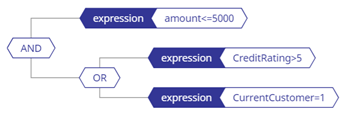
The value contains three conditions: Amount <= 5000, CreditRating > 5, CurrentCustomer = 1. Each condition could be true or false. InterSystems IRIS evaluates the conditions individually before evaluating the relationships between them defined by the AND and OR operators.
The AND and OR operators can operate only on true and false values. That is, the operators must be positioned between two boolean values and return a single boolean result as follows:
| Operator | Result is true when... |
|---|---|
| AND | Both values are true. |
| OR | At least one of the values is true, or both are true. If one of the values is false and the other is true, then the result (as a whole) is still true. |
If a condition property contains multiple AND or OR operators, the AND operators take precedence over the OR operators. Specifically, all the AND operations are performed first. Then, the OR operations are performed. For example, consider the following set of conditions:
IF  Amount  <=  5000
AND  CreditRating > 5
OR  CurrentCustomer = 1
AND  CreditRating >= 5
The same set of conditions appears in the Rule Editor as follows:
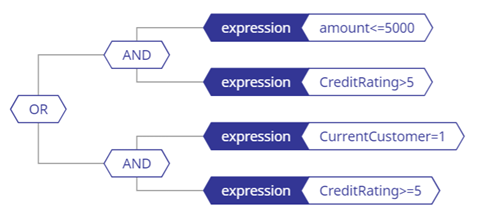
InterSystems IRIS evaluates the conditions as follows:
IF  (Amount  <=  5000  AND  CreditRating > 5)
OR  (CurrentCustomer = 1  AND  CreditRating >= 5)
That is, the whole set of conditions is true if either or both of the following statements is true:
-
Someone requests an amount less than 5,000 and has a credit rating better than average.
-
A current bank customer requests any amount and has a credit rating greater than or equal to the average.
If both statements are false, then the set of conditions (as a whole) is false.
To explain another way, InterSystems IRIS evaluates the set of conditions by taking the following steps:
-
Determine whether the result of the following AND expression is true or false:
IF  Amount  <=  5000
AND  CreditRating > 5
Suppose this result is called “SafeBet.”
-
Determine whether the result of the following AND expression is true or false:
IF  CurrentCustomer = 1
AND  CreditRating >= 5
Suppose this result is called “KnownEntity.”
-
Determine whether the result of the following OR expression is true or false:
IF  SafeBet is true
OR  KnownEntity is true
If SafeBet is true and KnownEntity is false, then the set of conditions is true. Similarly, if SafeBet is false and KnownEntity is true, then the set of conditions is true. Lastly, if both SafeBet and KnownEntity are true, then the set of conditions is true.

