

Programming Business Services, Processes, and Operations
This page discusses common programming tasks and topics when developing business services, processes, and operations for productions.
Introduction to Programming Business Hosts
When you create business host classes or adapter classes, you typically implement callback methods, define additional methods as needed, and add or remove settings.
Within a business host or adapter, your methods typically do some or all of the following tasks:
-
Get or set values of properties of the business host or adapter.
-
Define callback methods. A callback method is an inherited method that does nothing by default; your task would be to override and implement this method.
-
Execute inherited helper methods of the business host or adapter. Helper method is an informal term for a method meant for use by other methods.
In business operations and business processes, your methods typically invoke inherited methods to send messages to other business hosts within the production.
-
Generate log, alert, or trace notifications in response to various conditions that may arise. InterSystems IRIS uses the following terminology:
-
Log entries are intended to note items such as external, physical problems (for example, a bad network connection).
InterSystems IRIS® data platform automatically writes these to the Event Log.
-
Alerts are intended to alert users, via an alert processor that you define and add to the production.
InterSystems IRIS also automatically writes these to the Event Log.
-
Trace items are meant for debugging and diagnostic purposes. You can use these, for example, to locate program errors before deploying the production. InterSystems IRIS can write these to the Event Log, to the Terminal, or both.
Not all types of error or activity should necessarily generate these notifications. It is up to the developer to choose which occurrences to record, and how to record them. Note that the Event Log should not register program errors; these should be resolved before the production is released.
-
Key Principles for Productions
It is important to understand the programming practices that are best suited within productions. Business hosts execute in separate processes, which means that you should make sure that:
-
If a business host starts a transaction, the same business host should complete it or roll it back.
To be more specific, if your business host code starts a transaction, such as by an ObjectScript TSTART or a SQL statement with %COMMITMODE = EXPLICIT, the same business host requires code to complete or roll back that transaction. When nesting transactions, be aware that the process will hold all locks until all parts of the transaction are either committed or rolled back.
-
If a business host allocates any system resources (such as taking out locks or opening devices), the same business host should release them.
-
Any information that is to be shared between business hosts should be carried within a message sent between them (rather than via public variables).
Failure to follow these guidelines can cause your production to become inoperable.
Similar considerations apply to business rules and data transformations.
Also, you must often handle error codes received from InterSystems IRIS methods. The InterSystems IRIS Interoperability development framework is designed to allow your custom code to be simple and linear as possible with regard to error codes. For example:
-
The OnProcessInput() method of business services and the OnMessage() and other user-written MessageMap methods of business operations are wrapped by the production framework, so that you do not need to include any additional error trapping in your code.
-
The adapter methods available for use by custom business operation code are guaranteed never to trap out, as are the framework methods available to custom code, such as SendAlert() and SendRequestSync().
-
The adapter methods automatically set suitable values for the Retry property of the business host when error conditions do occur.
The details vary by adapter, but the common principle is to cause a retry for temporary errors and for errors that allow manual intervention. For example, if the HTTP outbound adapter times out, it will automatically set Retry equal to 1, for the associated business operation. If this is not suitable for your use case, your custom code can set Retry equal to 0.
Given these precautions built into the production framework, InterSystems recommends that for normal circumstances your custom code should simply check the error code of each call, and if it is an error value, quit with that value. The following is an example of this coding style:
Class Test.FTP.FileSaveOperation Extends Ens.BusinessOperation
{
 Parameter ADAPTER = "EnsLib.File.OutboundAdapter";

 Method OnMessage(pRequest As Test.FTP.TransferRequest,
                  Output pResponse As Ens.Response) As %Status
 {
 Set pResponse=$$$NULLOREF
 Set tFilename=..Adapter.CreateTimestamp(pRequest.Filename,"%f_%Q")
 ; file with timestamp should not already exist
 $$$ASSERT('..Adapter.Exists(tFilename))
 Set tSC=..Adapter.PutStream(tFilename,pRequest.StreamIn) Quit:$$$ISERR(tSC) tSC
 Quit $$$OK
 }
}
More complicated scenarios are sometimes useful, such as for instance executing a number of SQL statements in a business operation using the SQL adapter and then calling a rollback before returning if any of them fail. Depending on the API being called, it may be necessary to check public variables in addition to any returned status values. An example of this is checking SQLCODE in the case of embedded SQL. However, the coding style in the previous example is the best practice in simple circumstances.
Passing Values by Reference or as Output
If you are not familiar with passing values by reference or output, this section is intended to orient you to this practice.
Many InterSystems IRIS methods return at least two values: a status (an instance of %StatusOpens in a new tab) and a response message or other returned value. Typically the response message is returned by reference or as output. If a value is returned by reference or as output, that means:
-
When you define the method, the method must set the corresponding variable.
-
When you invoke the method, you must include a period before the corresponding argument.
The following examples demonstrate these points.
Typical Callback Method
The following shows the signature of a typical callback method:
method OnRequest(request As %Library.Persistent, Output response As %Library.Persistent) as %Status {}
The keyword Output indicates that the second argument is meant to be returned as output. In your implementation of this method, you would need to do the following tasks, in order to satisfy the method signature:
-
Set a variable named response equal to an appropriate value. This variable must have a value when the method completes execution.
-
End with the Quit command, followed by the name of a variable that refers to an instance of %StatusOpens in a new tab.
For example:
Method OnRequest(request As %Library.Persistent, Output response As %Library.Persistent) as %Status
{
   //other stuff
   set response=myObject
   set pSC=..MyMethod() ; returns a status code
   quit pSC
}When setting the response equal to the request, be sure to use %ConstructClone(). Otherwise, the request object will change as you manipulate the response, giving you an inaccurate record of the message that was sent to the business host. For example, if you want to set the response to the request, enter:
Method OnRequest(request As %Library.Persistent, Output response As %Library.Persistent) as %Status
{
  set response=request.%ConstructClone()
  // manipulate response without affecting the request object
}
This example discusses a value returned as output, but the details are the same for a value passed by reference.
Typical Helper Method
The following shows the signature of a typical inherited helper method:
method SendRequestSync(pTargetDispatchName As %String,
                       pRequest As %Library.Persistent,
                       ByRef pResponse As %Library.Persistent,
                       pTimeout As %Numeric = -1,
                       pDescription As %String = "") as %Status {}
The keyword ByRef indicates that the third argument is meant to be returned by reference. To invoke this method, you would use the following:
set sc=##class(pkg.class).SendRequestSync(target,request,.response,timeout,description)Notice the period before the third argument.
This example discusses a value passed by reference, but the details are the same for a value returned as output.
Accessing Properties and Methods from a Business Host
When you define a method in a business host class, you might need to access properties or methods of that class or of the associated adapter. This section briefly describes how to do these things.
Within an instance method in a business host, you can use the following syntaxes:
-
..bushostproperty
Accesses a setting or any other property of the business host. (Remember that all settings are properties of their respective classes.)
-
..bushostmethod()
Accesses an instance method of the business host.
-
..Adapter.adapterproperty
Accesses a setting or any other property of the adapter. (Note that every business host has the property Adapter. Use that property to access the adapter and then use dot syntax to access properties of the adapter.)
-
..Adapter.adaptermethod()
Accesses an instance method of the adapter, passing in arguments to the method. For example, to invoke the PutStream method of an outbound adapter from a business operation, enter:
..Adapter.PutStream(pFilename,..%TempStream)
Accessing Production Settings
You might need to access a setting of the production. To do so, use the macro $$$ConfigProdSetting. For example, $$$ConfigProdSetting("mySetting") retrieves the value of the production setting called mySetting. InterSystems suggests you wrap this macro in a $GET call for safety; for example:
set myvalue=$GET($$$ConfigProdSetting("mySetting"))
Also see Using Ens.Director to Access Settings.
Choosing How to Send Messages
In business operations and business processes, your methods typically invoke inherited methods to send messages to other business hosts within the production. This section discusses the options.
Synchronous and Asynchronous Sending
When you define business service, business process, and business operation classes, you specify how to send a request message from that business host. There are two primary options:
-
Synchronously—The caller stops all processing to wait for the response.
-
Asynchronously—The caller does not wait; immediately after sending the request the caller resumes other processing. When sending a request asynchronously, the caller specifies one of two options regarding the response to this request:
-
Ask to receive the response when it arrives.
-
Ignore the possibility of a response.
-
The choice of how to send a message is not recorded in the message itself and is not part of the definition of the message. Instead, this is determined by the business host class that sends the message.
Deferred Sending
In addition to the straightforward alternatives of synchronous (wait) and asynchronous (do not wait), it is possible to send messages outside InterSystems IRIS using a mechanism called deferred response.
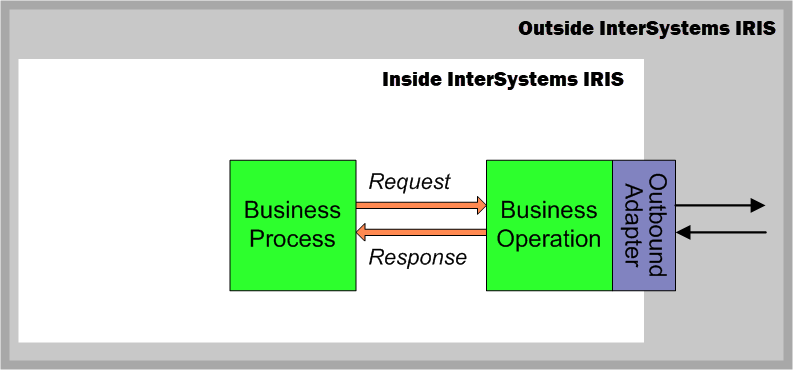
Suppose a business process wishes to invoke an action outside InterSystems IRIS. It sends a request to a business operation, which performs the invocation and returns the response. The business process is the intended recipient of any response; the business operation is simply the means by which the request goes out and the response comes in. The business operation will relay a response back if the business process made the request synchronously, or if it made the request asynchronously with asynchronous response requested. The following diagram summarizes this mechanism.
Now suppose the business operation that receives a request from a business process has been written to use the deferred response feature. The original sender is unaware of the fact that the response is going to be deferred by the business operation. Deferring the response is a design decision made by the developer of the business operation. If the business operation does in fact defer the response, when the original sender receives the response at the end of the deferral period, it is unaware that the response was ever deferred.
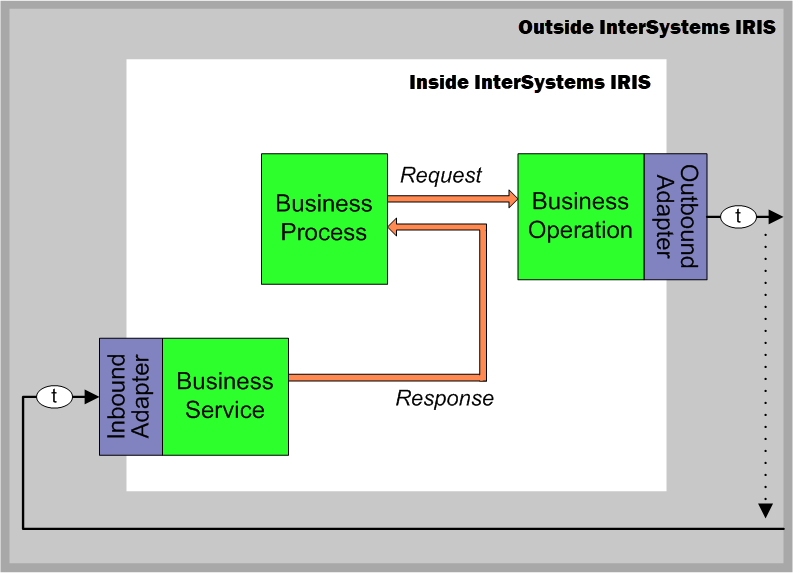
A business operation defers a response by calling its DeferResponse() method to generate a token that represents the original sender and the original request. The business operation must also find a way to communicate this token to the external entity, which is then responsible for including this token in any later responses to InterSystems IRIS. For example, if the external destination is email, a business operation can include the token string in the subject line of the outgoing email. The entity receiving this email can extract this token from the request subject line and use it in the response subject line. In the following diagram, the item t represents this token.
Between the time when the business operation defers the request, and when the response is finally received by the original sender, the request message has a status of Deferred. After the original sender receives the corresponding response, the request message status changes from Deferred to Completed.
An incoming event in response to the request can be picked up and returned to the original sender by any business host in the production. Exactly where the event arrives in an InterSystems IRIS production depends on the design of the production; typically, it is the task of a business service to receive incoming events from outside InterSystems IRIS. The business host that receives the incoming event must also receive the deferred response token with the event. The business host then calls its SendDeferredResponse() method to create the appropriate response message from the incoming event data and direct this response to the original sender. The original sender receives the response without any knowledge of how it was returned. The following figure shows a request and its deferred response.
Generating Alerts
An alert sends notifications to applicable users while a production is running, in the event that an alert event occurs. The intention is to alert a system administrator or service technician to the presence of a problem. Alerts may be delivered via email or other mechanism. All alerts also write messages to the InterSystems IRIS Event Log, with the type Alert.
The production alert mechanism works as follows:
-
When you create business host classes for the production, include code that:
-
Detects undesirable conditions or other circumstances that a user must address.
-
Generates alerts on those occasions.
-
-
You define and configure an alert processor, which is a business host, named Ens.Alert. The alert processor can optionally manage the alert to track the process of resolving the event. For details on defining an alert processor, see Defining an Alert Processor. Any production can include no more than one alert processor.
In a business host class (other than a BPL process class), do the following to generate an alert:
-
Create an instance of Ens.AlertRequestOpens in a new tab.
-
Set the AlertText property of this instance. Specify it as a string that provides enough information so that the technician has a good idea of how to address the problem.
-
Invoke the SendAlert() method of the business host class. This method runs asynchronously and thus does not delay the normal activities of the business host.

