

Working with Rules
This page briefly describes how to create business rules for interoperability productions. A rule set contains one or more rules that you define to satisfy specific functions in a business process. Once you create a new rule definition in the Rule Editor (Interoperability > Build > Business Rules), you are ready to start adding rules to a rule set.
Though you can give each rule a name, it is not required. By default, InterSystems IRIS® names the rules in sequential order in the form rule#n. If you give the rule a user-defined name, it appears in the class definition and also appears in parentheses next to the internal rule name in the rule log. The value of n changes if you reorder the rules in a rule set.
Defining Constraints
If the rule set contains routing rules, you can define constraints such that when a message makes its way through the rule set, the rule logic is executed only if the message matches the defined constraints. Leaving a field blank will match all values. To set constraints for a rule, double-click the rule and define the following settings:
Configuration name of one of the following items:
-
A business service (for a routing interface)
-
A message routing process (if another rule chains to this routing rule set)
Identifies the production message object that is being routed by this rule. The value of this field depends on the routing rule type:
-
For a General Message Routing Rule, you can click the ellipsis (...) next to the Message Class field to invoke the Finder Dialog and select the appropriate message class. You can choose the category of message class to narrow your choices.
-
For a Virtual Document Message Routing Rule, you can choose from the list of defined virtual document classes.
For virtual document routing rules, identifies the category of the message class and specifies its structure. You can choose from the list of category types defined for your chosen virtual document class. The types may be built-in or imported from a custom schema.
For virtual document routing rules, identifies the message structure. The acceptable values depend on the message class. You can choose from the list of category types defined for your chosen virtual document class. The types may be built-in or imported from a custom schema.
If you specify more than one value in the Document Name field, the rule matches any of the specified Document Name values and no others.
About If and Else Clauses
A rule can contain one or more if clauses and an else clause. Each clause can include actions such as assign or return.
The logic in an if clause can be executed only if the condition property associated with the clause holds true. The logic in an else clause can be executed only if none of the condition properties associated with the preceding if clauses holds true. When a rule contains multiple if clauses, only the logic in the first if clause where the condition property associated with the clause holds true is executed. See Boolean Expressions.
As you develop rules, keep the following points in mind:
-
Once the execution through a rule set encounters a return action, the execution of the rule set ends and returns to the business process that invoked the rule definition class.
-
You can control the execution of more than one rule in a rule set by omitting the returns. In other words, if you want to check all rules, do not provide a return action within any of the rule clauses. You may then provide a value in a return action at the end of the rule set for the case where no rule clauses evaluate to true.
-
Each if clause has a condition property. A common design for a general business rule set is one that contains one rule with a series of if conditions and returning a value depending on which condition is true. If you want to return a default value if none of the conditions is true, you can use the else clause with a return.
-
A common design for a routing rule set is one that contains several rules each with a different constraint defined and each with one if clause describing how and where to route the message that matches the constraint.
-
You can access property paths in virtual documents using the syntax described in Virtual Property Path Basics.
About Actions
Each if or else clause in a rule can include actions, but they are not required. The actions in a clause are executed if and only if the condition associated with the clause holds true. The following actions are supported:
| Rule Set Type | Action | Description |
|---|---|---|
| All | assign | Assigns values to properties in the business process execution context. |
| All | return | Returns to the business process without further execution of the rule. For general rules it also returns the indicated value to the result location. |
| All | trace | Adds the information you enter into the Event Log when this specific part of the rule is executed. For details, see <trace>. |
| All | debug | Adds the expression text and value to the Rule Log when this specific part of the rule is executed. The debug action is executed only if the router business process RuleLogging property specifies the d flag, For details on the RuleLogging property, see Rule Logging. |
| Segmented Virtual Document Routing Rule or HL7 Message Routing Rule | foreach | Loops through a repeating segment. A segment may repeat if it is designated as a repeating segment, is in a repeating loop, or both. See Using the foreach Action for more details. |
| Routing Rule | send | When evaluated by a routing engine business process, this action sends the message to a particular target after optionally transforming it. For the ability to pass data to the data transformation, see Passing Data to a Data Transformation. |
| Routing Rule | delete | When evaluated by a routing engine business process, this action deletes the current message. |
| Routing Rule | delegate | When evaluated by a routing engine business process, this action delegates the message to a different rule. |
The send, delete, and delegate actions should not be used within a BPL <rule>. If you include them, the action will not be executed and instead a string value will be returned that includes the given action.
You must ensure that you construct rule sets such that they are logically sound and result in the rule set being executed as you intended. For example, while it might make sense to set a default return value if none of the rules in a rule set are executed, it does not make sense to do so if you have created the rule set such that one rule is always executed. Typically, most actions reside in the if clauses of rules.
Using the foreach Action
You can use the foreach action within an if or an else. The foreach action allows you to loop through a repeating segment and reference any of the fields within the segment.
You specify the repeating segment in the propertypath property of the foreach action using the syntax described in Virtual Property Path Basics. For example, to access the OBX segments in the repeating OBXgrp of an HL7 document, you can specify HL7.{OBXgrp().OBX}, where the empty parentheses indicate the repeating group. A foreach action can contain one or more if clauses and an else clause. Within the clauses, you specify actions to execute when the conditions in the clauses hold true.
For example, you can use a foreach action to determine when a field in a repeating segment contains a particular value, and then specify a send action to route a message when the value is present. To reference the specific field, you can use Segment.{<field-name>} — for example: Segment.{ObservationIdentifier}.
The if and else clauses in a foreach action can contain one or more rule nodes. However, you cannot nest foreach actions.
When the rule executes a return action within a foreach loop, it exits the entire rule set, not just the loop or rule.
The following extract shows the use of a foreach action within a business rule. The action iterates through a repeating OBX segment in an HL7 document to determine when the ObservationIdentifier field contains certain string values. When the values are found, the rule sends the document to a file operation. When the values are not found, the rule logs an entry in the Event Log using a trace action.
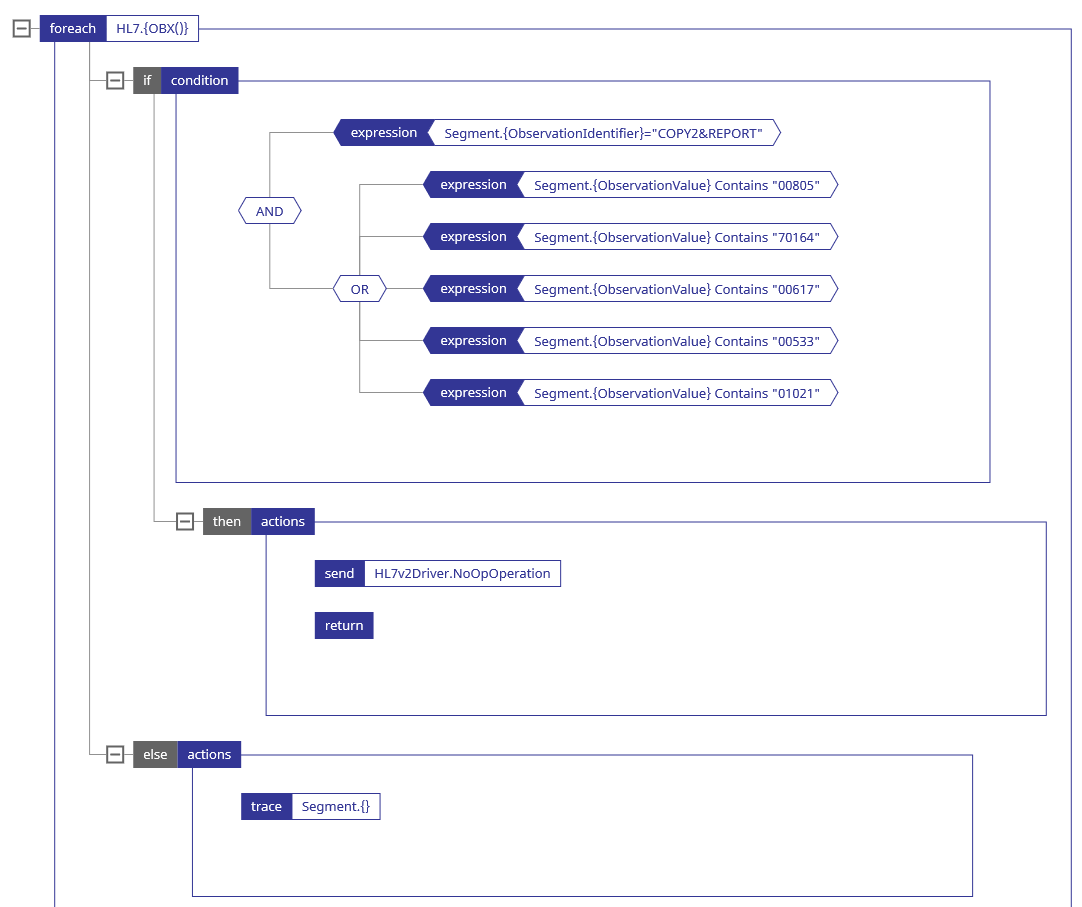
For reasons of space, this diagram does not show the if that contains this foreach.
Disabling a Rule
If you would like to prevent a rule set from executing a rule, but do not want to delete the rule, you can disable it. Simply double-click the rule, and select Disable.
Passing Data to a Data Transformation
A Send action can invoke a data transformation before sending the message to a target within the production. This data transformation can use its aux variable to obtain information from the rule. Some of this data, for example the name of the rule and the reason the rule was fired, is available to the transformation without making changes to the rule class.
In order to pass additional information to the transformation, you need to edit the rule class in an IDE to assign values to properties of the class. A value assigned to the RuleUserData property of the rule class is available to the transformation if it accesses the aux.RuleUserData variable. A value assigned to the RuleActionUserData property of the rule class is available to the transformation as aux.RuleActionUserData.
For additional information about accessing the aux variable in a transformation, see the list of valid expressions in DTL Syntax Rules.

